
How to Debug Salesforce Flows (Flow Logs & Analysis)
Debug Salesforce Flows three ways: Flow Builder's Debug mode for testing with chosen inputs, debug logs (FLOW_ELEMENT events) for what actually happened during a real record save alongside triggers and validation, and flow error emails for the failing element. For production behavior, especially record-triggered flows interacting with Apex, the debug log is the source of truth, because it is the only view that shows your flow alongside every other automation competing for the same record and the same governor limits.
Debug mode vs. debug logs
| Flow Builder Debug mode | Debug logs | |
|---|---|---|
| What it shows | Element-by-element path for a simulated run | What actually ran in a real transaction |
| Sees trigger interaction | No | Yes: flows interleaved with Apex, validation, workflow |
| Good for | Building & unit-testing a flow | Diagnosing production incidents and cross-automation bugs |
| Limitation | Simulated context can differ from real saves | Requires trace flag; verbose output |
A third option: Debug on a real record
Flow Builder's newer debug options close much of the gap between simulation and reality. When debugging a record-triggered flow you can choose an existing record rather than entering values by hand, and enable "Run the flow as if the record was updated" to exercise the actual trigger conditions.
More useful still is the "Show details of what's executed and rollback pending record changes" option. This runs the flow against real data, shows you every element result, and then rolls everything back, so you can debug a destructive flow against production-like data without changing anything. It is the closest you get to a real transaction while remaining in the builder.
What it still cannot show you is other automation. If a trigger, workflow rule or second flow touches the same record, Debug mode will not reveal it, because it is running your flow in isolation rather than replaying a full save. For that you need the log.
Why your Flow is not appearing in the log
The single most common blocker when debugging flows, and it is a naming problem rather than a technical one. Flow events are controlled by the Workflow log category, not a category called "Flow".
If your log shows triggers and validation rules but no FLOW_ events at all, raise Workflow to FINER and re-run. At INFO you get little more than the fact that a flow started; at FINE you get elements; FINER gives you element-level detail with variable assignments, which is what you usually want.
| Workflow level | What you get |
|---|---|
INFO | Minimal: enough to see that a flow ran, rarely enough to debug it |
FINE | Element execution, so you can follow the path the flow took |
FINER | The practical default: element detail plus variable assignment values |
FINEST | Maximum detail, verbose enough to risk truncating the log |
Keep ApexCode low while doing this. If both categories are high the log fills with Apex statement detail and may truncate before reaching your flow, and a truncated log drops lines from the middle, which is exactly where your flow was. See debug log levels explained.
Reading Flow events in a debug log
Set the Workflow category to FINER and each flow run produces a readable trail:
09:12:44.2 (201400021)|FLOW_START_INTERVIEW|3001x00000AbCdE|Opportunity_After_Save
09:12:44.2 (203100450)|FLOW_ELEMENT_BEGIN|3001x00000AbCdE|FlowDecision|Check_Stage
09:12:44.2 (203900112)|FLOW_ELEMENT_END|3001x00000AbCdE|FlowDecision|Check_Stage
09:12:44.3 (210222040)|FLOW_ELEMENT_ERROR|The flow tried to access a null value...
FLOW_START_INTERVIEW: which flow started (interview = one execution).FLOW_ELEMENT_BEGIN/END: each element as it runs; diff the elapsed counters to time an element.FLOW_BULK_ELEMENT_*: bulkified element execution across many records in one go.FLOW_ELEMENT_ERROR, the failing element and message, is the closest thing to a flow stack trace.
Because these events sit in the same log as CODE_UNIT_STARTED trigger events, the log answers the question Debug mode can't: did my flow run before or after my trigger, and who overwrote whose field? That interleaving is exactly what ForceLens's Order of Execution view reconstructs visually; see the debug log analyzer guide.
Worked example: tracing a failing flow
Here is what a null-value failure actually looks like in a log, and how to read backwards from the error to the cause:
09:12:44.2 (201400021)|FLOW_START_INTERVIEW|3001x00000AbCdE|Opportunity_After_Save
09:12:44.2 (203100450)|FLOW_ELEMENT_BEGIN|3001x00000AbCdE|FlowRecordLookup|Get_Account
09:12:44.2 (204800119)|FLOW_ELEMENT_END|3001x00000AbCdE|FlowRecordLookup|Get_Account
09:12:44.2 (205100332)|FLOW_ELEMENT_BEGIN|3001x00000AbCdE|FlowAssignment|Set_Owner
09:12:44.3 (210222040)|FLOW_ELEMENT_ERROR|The flow tried to access a null value...
Read it in this order:
- The error names
Set_Owner, an Assignment element. But assignments do not fail on their own; they fail because of what they are reading. - Look at the element immediately before it.
Get_Accountcompleted without error, which is exactly the trap: a Get Records that finds nothing still ends normally. - Notice what is missing. There is no Decision element between the lookup and the assignment, so nothing checked whether a record was found.
- Conclusion: the Opportunity had no matching Account,
Get_Accountreturned null, andSet_Ownertried to read a field from nothing. The fix belongs afterGet_Account, not atSet_Ownerwhere the error appeared.
The general principle: a Flow error names where execution stopped, not where the problem started. Work backwards through the preceding elements, paying particular attention to any Get Records that succeeded without returning data.
Raising Workflow to FINER makes this faster still, because variable assignments appear in the log, so you can see a variable holding null before the element that chokes on it, rather than inferring it.
Record-triggered flows in the order of execution
- System validation → before-save flows → before triggers → validation rules → duplicate rules → record saved (not committed)
- After triggers → assignment/auto-response/workflow rules → escalation rules → after-save flows → entitlement/roll-ups → commit
Rules of thumb that fall out of this: use before-save flows for same-record field updates (no recursion, dramatically faster) and after-save flows only for actions on other records or async work. An after-save flow updating its own record re-runs the entire order of execution, a common source of both bugs and CPU limit errors.
Common Flow errors and their causes
| Error | Usual cause | Fix |
|---|---|---|
| "The flow tried to access a null value" | Get Records found nothing; later element references the empty variable | Decision check on "found = null" after every Get Records |
| Unhandled fault on DML element | Validation rule, required field, or duplicate rule blocked the save | Add fault paths; surface the fault message |
| "Too many SOQL queries: 101" | Get Records inside a loop, or flow + trigger recursion | Query before the loop; see SOQL optimization |
| Apex CPU time limit exceeded | Loops over large collections; stacked automations | Bulk-shaped design; consolidate flows; see CPU guide |
| Flow finishes but data is "wrong" | Another automation ran later and overwrote the value | Read the order of execution in the debug log |
Fixing "The flow tried to access a null value"
The most common Flow failure by a wide margin, and it almost always traces back to a Get Records element that found nothing.
The critical detail: when Get Records finds no match, it does not throw an error. It succeeds and returns null. The flow continues happily until a later element tries to read a field from that empty variable, and the failure surfaces there, several elements away from the actual cause. This is why the error message rarely points at the real problem.
The fix is a Decision element immediately after every Get Records, checking the record variable Is Null = True before any element touches it. Handle the empty case explicitly rather than assuming a record was found.
Two related traps worth knowing:
- Get Records set to return "All records" gives you a collection, not a single record. Checking a collection for null is not the same as checking whether it is empty; test the count instead.
- A lookup field that is blank produces the same failure when a later element traverses it. Guard the traversal, not just the query.
Fault paths, and why the default behaviour is unhelpful
Without a fault path, a failing element ends the interview, rolls the transaction back, and sends an error email to the flow's owner, while the user typically sees a generic, unhelpful message. Adding fault connectors to every element that can fail is the single highest-value habit in Flow development.
Elements that need one: Get Records, Create Records, Update Records, Delete Records, Apex Actions, and any external callout. On the fault path, surface the real reason rather than a generic apology:
{!$Flow.FaultMessage}
That global variable holds the actual system error: the validation rule text, the required field name, the duplicate rule message. Displaying it in a screen flow, or writing it to a field or custom log object in a record-triggered flow, converts an opaque failure into something diagnosable without a debug log at all.
A caution: a fault path that silently swallows errors is worse than no fault path. If the flow continues as though nothing happened, you get corrupted data instead of a visible failure. Always record the fault somewhere you will actually look.
Flows share Apex governor limits
Flows are not exempt from governor limits, and this surprises people who think of them as declarative rather than code. Every Get Records is a SOQL query. Every Create, Update or Delete Records element is DML. They draw from the same per-transaction budget as your Apex: the 100-query limit covers "all SOQL queries fired by triggers, classes, flows, and API calls" in the transaction.
Three consequences follow:
- A Get Records inside a loop is a query in a loop, identical in cost to writing one in Apex. Move it outside and filter the collection in memory, or use a Get Records that fetches everything up front.
- Multiple flows on one object compound. Three record-triggered flows each issuing four queries spend twelve of your hundred before any Apex runs.
- A flow can break a trigger that was previously fine. Adding a flow to a heavily automated object consumes limits the Apex was relying on, and the error surfaces in the Apex, which is where people then go looking for a bug that is not there.
When a flow causes limit errors, the diagnosis path is the same as for Apex: see SOQL optimization for query counts and the CPU guide for element-heavy loops.
Recognising a bulkification problem in the log
Flows bulkify automatically in many cases, and the log tells you whether yours did. FLOW_BULK_ELEMENT_BEGIN events mean Salesforce processed the element once across all records: the outcome you want. Repeated FLOW_ELEMENT_BEGIN events for the same element name mean it ran per record, which is what exhausts limits during data loads.
The usual culprit is a DML or Get Records element placed inside a Loop element. Move it outside: collect records into a collection variable within the loop, then perform a single Create or Update Records element on the whole collection afterwards. This is the Flow equivalent of collection DML in Apex, and it produces the same order-of-magnitude improvement.
Consolidating multiple flows on one object
Multiple record-triggered flows on the same object run in an order you do not control, exactly like multiple Apex triggers. If one flow sets a field another reads, the behaviour is undefined and can change between releases.
You can set a trigger order value on each flow to sequence them explicitly, which is the minimum fix. The better approach in most orgs is consolidation: one before-save flow and one after-save flow per object, with Decision elements branching internally. That gives deterministic ordering, a far more readable debug log, and fewer interviews competing for the same limits.
Analyzing Flow structure with ForceLens
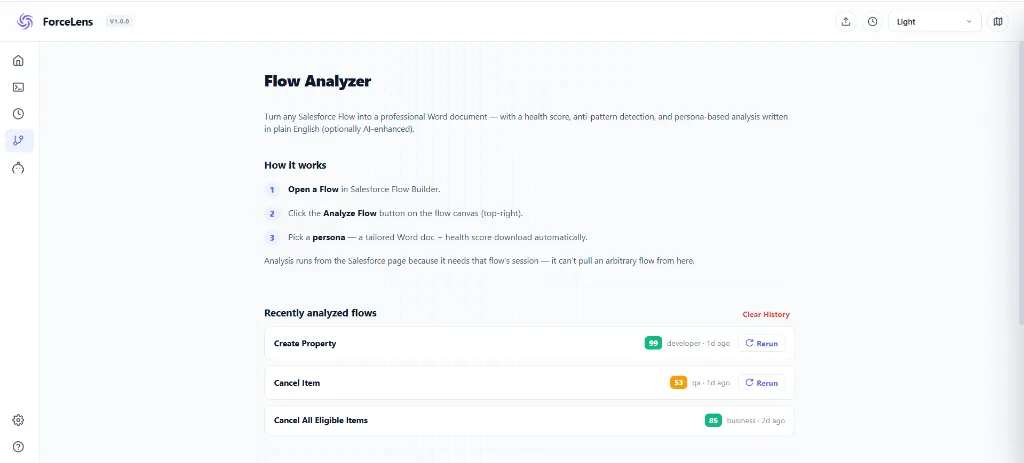
Runtime debugging finds what broke; structural review finds what will break. From Flow Builder, one click hands the entire flow to ForceLens, which parses every element, decision, loop and fault path, scores the flow's health, and writes up findings through the lens you pick:
- Developer: null handling, bulkification, DML in loops, fault-path coverage.
- Business Analyst: what the flow actually does in business terms.
- QA: test scenarios and edge cases the branches imply.
- Security: sharing context, data exposure, unsafe assignments.
You get a health score, a ready .docx report, and an AI prompt for deeper analysis with your own key, free and processed locally.
Frequently asked questions
How do I debug a Salesforce Flow?
Use Flow Builder's Debug mode for simulated runs, debug logs (FLOW_ELEMENT events) for real transactions, and flow error emails for failures. For production behavior with triggers involved, the debug log is the source of truth.
Do Flows appear in debug logs?
Yes, with the Workflow category at FINE/FINER you get FLOW_START_INTERVIEW, FLOW_ELEMENT_BEGIN/END, FLOW_BULK_ELEMENT and FLOW_ELEMENT_ERROR events, interleaved with Apex triggers in true execution order.
When do record-triggered flows run in the order of execution?
Before-save flows run early, before the record is written; after-save flows run late, after triggers and workflow, shortly before commit. After-save flows that update their own record re-run the entire order of execution.
What's the most common Flow error?
Null access: a Get Records element finds nothing and a later element references the empty variable. Guard every Get Records with a decision check and put fault paths on DML elements.
Why are my Flows not showing in the debug log?
Flow events are controlled by the Workflow log category, not one named "Flow", which is why raising every other category still shows nothing. Set Workflow to FINER and keep ApexCode low so the log does not truncate before reaching your flow.
Do Flows count toward Apex governor limits?
Yes. Every Get Records is a SOQL query and every Create/Update/Delete Records element is DML, drawn from the same per-transaction budget as Apex. The 100-query limit covers all queries from triggers, classes, flows and API calls combined, which is why adding a flow can cause limit errors that surface inside unrelated Apex.
What is the $Flow.FaultMessage variable?
A global variable holding the actual system error for the element that failed (the validation rule text, the missing required field, or the duplicate rule message). Display it on a fault path in a screen flow, or write it to a field or logging object in a record-triggered flow, to turn an opaque failure into something diagnosable.
In what order do multiple record-triggered flows run?
Undefined unless you set it. Like multiple Apex triggers on one object, multiple flows for the same trigger event run in no guaranteed order. Set an explicit trigger order value on each flow, or consolidate to one before-save and one after-save flow per object with internal Decision branching.
Can I test a Flow against a real record without changing data?
Yes. In Flow Builder's debug options, choose an existing record and enable "Show details of what's executed and rollback pending record changes". The flow runs against real data and shows every element result, then rolls the changes back. It will not show other automation touching the same record; for that you need a debug log.
Read your next Flow like an expert
Analyze any Flow from Flow Builder in one click: health score, expert findings, and a ready report. Free and local.