
Salesforce Order of Execution, Step by Step
When a record is saved, Salesforce runs a fixed sequence of 20 steps: system validation → before-save flows → before triggers → validation rules → duplicate rules → save (uncommitted) → after triggers → assignment, auto-response and workflow rules → escalation rules → after-save flows → entitlements → roll-up summaries → sharing → commit → post-commit logic (emails, async jobs). Knowing this order explains most "why did my field get overwritten?" and "why didn't my validation rule fire?" mysteries.
The sequence at a glance
The full save is twenty steps, but they group into four phases. Learn the phases first: almost every real-world question is answered by knowing which phase something belongs to.
| Phase | Steps | What happens | Record has an Id? |
|---|---|---|---|
| 1. Before save | 1–6 | Load, before-save flows, before triggers, validation, duplicate rules | No (on insert) |
| 2. Saved, not committed | 7–8 | Record written to database, after triggers run | Yes |
| 3. Declarative automation | 9–18 | Assignment, workflow, flows, entitlements, roll-ups, sharing | Yes |
| 4. Commit and after | 19–20 | Everything made permanent, then email and async work | Yes |
Two rules follow directly from this table and explain most confusion. You cannot access the record's Id in a before-insert trigger, because it does not exist until step 7. And anything in phases 1–3 can still be rolled back; only step 19 makes it real.
The full sequence for a record save
Salesforce's official order-of-execution reference documents these twenty steps. Where the wording matters, it is quoted directly:
Phase 1: Before the record is saved
- Load the original record from the database, or initialise it for an insert or upsert.
- Load the new field values from the request, overwriting the old ones. System validation checks run here: required fields, field formats, maximum field lengths, and foreign keys.
- Before-save record-triggered flows execute. These modify the record in memory with no additional DML, which makes them the fastest way to set a field on the record being saved.
- All before triggers execute (
before insert,before update,before delete). - Most system validation runs again, along with your custom validation rules. This ordering is important: validation runs after before triggers, so a before trigger can correct data that would otherwise fail validation.
- Duplicate rules execute. As the docs put it: "If the duplicate rule identifies the record as a duplicate and uses the block action, the record isn't saved."
Phase 2: Saved to the database, not yet committed
- The record is saved to the database, but not committed. Record Ids exist from this point on. Nothing is permanent yet.
- All after triggers execute (
after insert,after update,after delete).
Phase 3: Declarative automation
- Assignment rules execute (Leads and Cases).
- Auto-response rules execute (Leads and Cases).
- Workflow rules execute. This is the step with the biggest consequence for Apex developers; see the section below.
- Escalation rules execute (Cases).
- Process Builder processes and workflow-launched flows execute. The documentation notes these run in no guaranteed order relative to one another.
- After-save record-triggered flows execute. Updates made here to the same record re-enter the save sequence.
- Entitlement rules execute.
- Roll-up summary fields on the parent recalculate. The parent record then "goes through save procedure," meaning the parent's own triggers, workflow and flows all fire.
- Roll-up summary fields on the grandparent recalculate, and the grandparent likewise goes through its full save procedure.
- Criteria-based sharing evaluation runs.
Phase 4: Commit and post-commit
- All DML operations are committed to the database. Up to this moment, any failure rolls back everything.
- Post-commit logic executes: emails send, asynchronous Apex jobs are enqueued, and asynchronous flow paths run, each in its own separate transaction.
Steps 16 and 17 are where transactions quietly become expensive. A roll-up on a parent triggers a complete save procedure for that parent, which can fire its own triggers and flows, which may update their parents. A single child record update can cascade through several full save sequences, all sharing one set of governor limits.
The workflow field update re-fire
This one detail causes more confusion than the rest of the sequence combined, so it is worth quoting exactly. When a workflow rule performs a field update, Salesforce:
"Executes before update triggers and after update triggers, regardless of the record operation (insert or update), one more time (and only one more time)."
Two consequences follow, and they pull in opposite directions.
Your update triggers run twice on a single save. This isn't a bug in your code; it's documented, intended behaviour. If your trigger is not idempotent, any logic that increments a counter, appends to a field, or sends a notification will do it twice.
Validation does not run again. The docs are explicit that "custom validation rules, flows, duplicate rules, processes built with Process Builder, and escalation rules aren't run again" during this re-execution. This is the direct answer to the most common question on this page: a workflow field update can write a value that your validation rules would have rejected, because validation already ran at step 5 and does not get a second chance.
If a validation rule seems to be ignored, check for a workflow field update on that object before assuming the rule is wrong.
Where to put your logic
Most order-of-execution problems are really placement problems. This table answers the question directly:
| You want to… | Use | Why |
|---|---|---|
| Set a field on the record being saved | Before-save flow, or before trigger | No extra DML, since the record has not been written yet |
| Default or clean up incoming data | Before trigger | Runs before validation, so it can fix data that would fail |
| Create or update related records | After trigger | The record has an Id, so children can reference it |
| Validate across multiple records | Before trigger with addError() | Blocks the save with a field-level message |
| Call an external system | Queueable from an after trigger | Callouts are blocked while DML is uncommitted |
| Send an email on success | Post-commit logic, or async | Should not send if the transaction rolls back |
| React to a roll-up value | Async, or a trigger on the parent | Roll-ups recalculate at steps 16–17, after your after trigger |
The single most valuable line here is the first. A before-save flow updating its own record costs no DML at all, because the record is still in memory. The same change made in an after-save flow requires a full additional save — re-entering the sequence, re-firing update triggers, and re-spending limits. Salesforce measures before-save flows as substantially faster for exactly this reason, and moving same-record field updates from after-save to before-save is one of the highest-value optimisations available in a heavily automated org.
Multiple triggers on one object
The documentation is unambiguous: "If more than one trigger is defined on an object for the same event, the order of trigger execution isn't guaranteed."
This is not a theoretical concern. Two triggers on Account, both before update, may run in either order, and that order can change between deployments or releases. If one sets a field the other reads, the behaviour is genuinely undefined.
The remedy is the widely adopted one trigger per object pattern: a single trigger that delegates to a handler class, where you control sequencing explicitly in code.
trigger AccountTrigger on Account (before insert, before update,
                                  after insert, after update) {
    AccountTriggerHandler handler = new AccountTriggerHandler();

    if (Trigger.isBefore && Trigger.isUpdate) {
        handler.beforeUpdate(Trigger.new, Trigger.oldMap);
    }
    if (Trigger.isAfter && Trigger.isUpdate) {
        handler.afterUpdate(Trigger.new, Trigger.oldMap);
    }
}
Beyond determinism, this makes the debug log dramatically easier to read: one CODE_UNIT_STARTED per object per event, instead of several interleaved in an order nobody chose.
"Maximum trigger depth exceeded"
Salesforce allows a trigger chain to nest 16 levels deep. System.DmlException: Maximum trigger depth exceeded means something re-entered the same trigger 16 times, almost always because a trigger updates records that fire itself, directly or through another object that points back.
Spotting it in the log. Count the CODE_UNIT_STARTED entries for the same trigger name inside one EXECUTION_STARTED block. Recursion looks like the same trigger repeating with progressively deeper indentation, and the same query line number appearing over and over beneath it.
09:15:22.101|CODE_UNIT_STARTED|[EXTERNAL]|AccountTrigger on Account trigger event AfterUpdate
09:15:22.140|CODE_UNIT_STARTED|[EXTERNAL]|AccountTrigger on Account trigger event AfterUpdate
09:15:22.188|CODE_UNIT_STARTED|[EXTERNAL]|AccountTrigger on Account trigger event AfterUpdate
...
09:15:23.702|FATAL_ERROR|System.DmlException: Update failed. First exception on row 0; first error: Maximum trigger depth exceeded
The limit you hit is rarely the real bug. Recursion also multiplies every query and DML beneath it, so the same root cause often surfaces first as "Too many SOQL queries: 101". If a query count is unexpectedly high, check for trigger repetition before optimising the query itself.
The fix is a static recursion guard held in a helper class, so the trigger body runs once per transaction:
public class TriggerGuard {
    private static Set<String> ran = new Set<String>();

    public static Boolean firstRun(String key) {
        if (ran.contains(key)) { return false; }
        ran.add(key);
        return true;
    }
}
Static variables live for the life of the transaction, which is exactly the scope you want. Guard the handler method rather than the whole trigger, so that legitimate second passes, such as a before-update after a workflow field update, still run when they should.
The consequences that bite people
- "My validation rule didn't catch it": a workflow field update or after-save flow changed the value after validation ran.
- "My trigger ran twice." Workflow field updates and same-record after-save flow updates legitimately re-fire update triggers, so if your trigger isn't idempotent, you get doubled logic.
- "The rollup didn't see my change" because order matters here: roll-ups recalculate near the end, and logic that reads parent totals in an after trigger sees pre-recalc values.
- "The email sent but the record failed." It can't; emails go post-commit. Async jobs enqueued during the transaction, however, die with a rollback.
- Recursion cascades: trigger updates parent → parent trigger updates children → repeat. Each hop re-spends governor limits and CPU.
Worked example: the field that keeps reverting
A support ticket that appears in every org eventually. A user sets Priority = High, saves, and the field shows Medium afterwards. Nothing in the UI explains it.
Walking the sequence identifies the culprit quickly:
- The user's value arrives at step 2 and is written onto the record.
- A before-save flow at step 3 or a before trigger at step 4 could overwrite it: check these first, since they act on the in-memory record and leave no separate DML trace.
- Validation at step 5 sees whatever those produced, not what the user typed.
- A workflow field update at step 11 could overwrite it after validation, and validation does not re-run to object.
- An after-save flow at step 14 could update the record again, re-entering the sequence.
In the debug log, search for the field name. The last write before EXECUTION_FINISHED wins. If a WF_FIELD_UPDATE event names your field, you have the answer, and it also explains why validation did not stop it.
Worked example: the callout that will not run
An after-insert trigger performs a callout and fails with You have uncommitted work pending. The order of execution explains it precisely: after triggers run at step 8, but the commit does not happen until step 19. Salesforce will not hold an open database transaction while waiting on an external system.
The fix is to defer the callout past the commit by enqueuing a Queueable that implements Database.AllowsCallouts. It runs at step 20 in its own transaction, with the DML safely committed. This is also why the callout correctly never fires when the save fails: a rolled-back transaction discards the queued job.
Worked example: MIXED_DML_OPERATION
The full text is MIXED_DML_OPERATION, DML operation on setup object is not permitted after you have updated a non-setup object (or vice versa). Salesforce commits setup objects, which include User, Group, GroupMember, PermissionSetAssignment and the queue objects, in a separate transaction from everything else. One transaction therefore cannot write both kinds.
Spotting it in the log. Look for two DML_BEGIN events inside one EXECUTION_STARTED block whose Type: values differ in kind. The FATAL_ERROR names the second object, which is the one that was rejected, not the one that caused the problem.
15:03:11.204 (204331002)|DML_BEGIN|[18]|Op:Update|Type:Account|Rows:1
15:03:11.288 (288440190)|DML_BEGIN|[24]|Op:Insert|Type:PermissionSetAssignment|Rows:1
15:03:11.301 (301882774)|FATAL_ERROR|System.DmlException: Insert failed. First exception on row 0; first error: MIXED_DML_OPERATION
The first DML_BEGIN at line 18 is the real culprit: updating the Account made this a non-setup transaction, so the setup-object insert at line 24 had nowhere to go. Reversing the order does not help, because the restriction runs in both directions.
The fix is to separate the transactions. Move the setup-object DML into an @future method or a Queueable, which runs in its own transaction with its own limits:
@future
public static void assignPermissionSet(Id userId, Id permSetId) {
    insert new PermissionSetAssignment(
        AssigneeId = userId, PermissionSetId = permSetId);
}
In tests, System.runAs() creates the same boundary, which is why a test can pass while the trigger fails in production. If your test does not reproduce the error, check whether the setup DML sits inside a runAs block.
Seeing the real order in your own org
The list above is the theory. Your org's reality (which of your flows, triggers and rules ran, in which order, for a specific save) is written in the debug log as a sequence of CODE_UNIT_STARTED, FLOW_START_INTERVIEW, VALIDATION_RULE and WF_RULE_* events. Reading that interleaving by hand works (see how to read Apex debug logs) but is slow.
Which log event corresponds to which step
Use this to translate the sequence above into what you are actually looking at in a log:
| Step | Log event to search for |
|---|---|
| Before-save flow (3) | FLOW_START_INTERVIEW before any trigger code unit |
| Before / after triggers (4, 8) | CODE_UNIT_STARTED naming the trigger and its event |
| Validation rules (5) | VALIDATION_RULE, VALIDATION_FORMULA, VALIDATION_PASS/FAIL |
| Duplicate rules (6) | DUPLICATE_DETECTION_BEGIN |
| Workflow rules (11) | WF_RULE_EVAL_BEGIN, WF_FIELD_UPDATE |
| After-save flow (14) | FLOW_START_INTERVIEW after the after-trigger code unit |
| Commit (19) | EXECUTION_FINISHED with no FATAL_ERROR above it |
Two signatures are worth learning to recognise instantly. A WF_FIELD_UPDATE followed by a second CODE_UNIT_STARTED for the same trigger is the documented re-fire from step 11, not a bug. And the same trigger appearing three or more times is genuine recursion, which needs a guard.
Remember that the log shows only what your log levels captured. Flow events require the Workflow category to be raised, a detail that catches people out since the name does not mention flows. If you are seeing triggers but no flows, that is almost always why; see debug log levels explained.
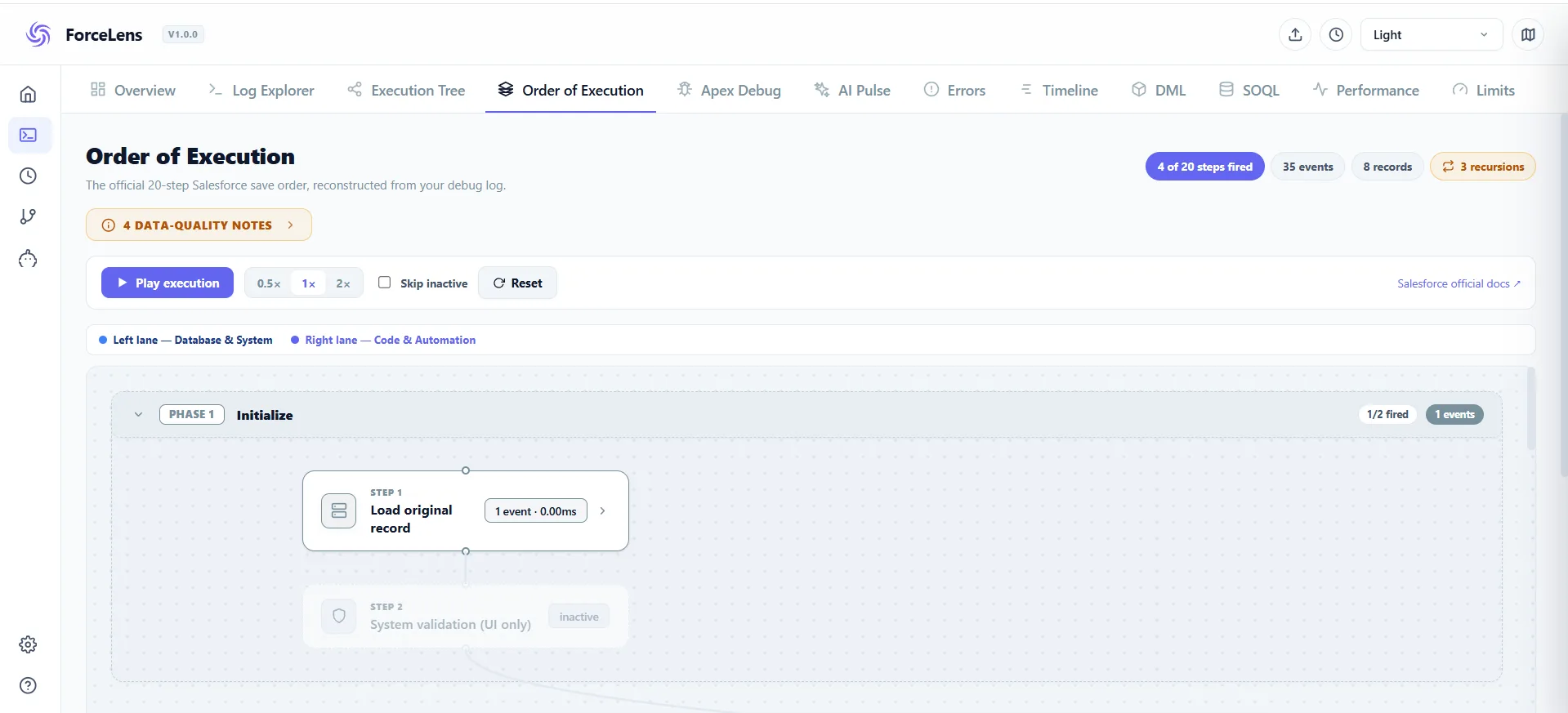
This is ForceLens's signature feature: its Order of Execution view reconstructs the diagram from your actual log: every trigger, flow, validation and workflow in the order they really fired, including re-entries. The whiteboard drawing, generated from production truth.
Frequently asked questions
What is the Salesforce order of execution?
The fixed sequence of steps Salesforce runs on every record save, from system validation and before-save flows through triggers, rules, after-save flows and roll-ups to the final commit and post-commit logic.
Do before-save flows run before or after triggers?
Before. The start of the sequence is: system validation → before-save flows → before triggers → validation rules.
Why does my trigger fire twice on one save?
A workflow field update or a same-record after-save flow update re-saved the record, re-firing update triggers. The debug log shows the exact re-entry.
How can I see the order of execution for a real save?
Capture a debug log of the save and follow the event sequence, or open it in ForceLens, which reconstructs the order visually.
Why is my validation rule not firing?
Most often a workflow field update changed the value after validation ran. Validation rules execute at step 5, and when a workflow field update re-fires the update triggers, Salesforce documents that "custom validation rules, flows, duplicate rules, processes built with Process Builder, and escalation rules aren't run again". The workflow can therefore write a value your rule would have rejected.
Why can't I get the record Id in a before insert trigger?
Because it does not exist yet. The record is written to the database at step 7, and before triggers run at step 4. If you need the Id, to create child records for example, do that work in an after insert trigger.
Are before-save flows faster than after-save flows?
Substantially, for same-record field updates. A before-save flow modifies the record in memory before it is written, costing no additional DML. An after-save flow updating the same record requires another save, which re-enters the sequence and re-fires update triggers. Moving same-record updates to before-save is one of the highest-value optimisations in an automated org.
In what order do multiple triggers on the same object run?
Undefined. Salesforce documents that "if more than one trigger is defined on an object for the same event, the order of trigger execution isn't guaranteed", and it can change between deployments. Use one trigger per object delegating to a handler class so you control the sequence yourself.
Do roll-up summary fields fire the parent record's triggers?
Yes. At steps 16 and 17 the parent and grandparent recalculate, and each "goes through save procedure": their triggers, workflow rules and flows all execute. This is why one child update can cascade into several complete save sequences, all sharing a single set of governor limits.
What happens to async jobs if the transaction rolls back?
They never run. Asynchronous Apex is enqueued during the transaction but only dispatched after commit at step 20, so a rollback discards it. Emails behave the same way, which is why a failed save cannot send a confirmation email.
See your org's real execution order
Capture any save with ForceLens and get the order of execution as a diagram: triggers, flows, validation, re-entries and all. Free and local.